ADHD Task Management: Stop the Overwhelm with APT & TOAST (+ Free Guide)

For most ADHDers, there’s nothing more essential, nor more baffling, than effective task management. Many of us constantly walk around with a feeling that we haven’t done enough, or there must be something we’re forgetting, or that there is simply Too. Much. To do.

But you know what? Most of the time, the problem isn’t the tasks themselves. It’s that we’re not actually looking at tasks at all, we’re managing projects and life areas as if they were tasks.

No wonder your ADHD brain looks at the list and refuses to move!

So what is the best way to manage tasks with ADHD? It starts with knowing what a task actually is. In this post, I’ll walk you through the systems I use with clients: my own APT framework for categorising what you’re dealing with, and Siobhan Fox’s brilliant TOAST system for deciding what to actually do with it. 

Together, they’ll help you build what I like to call a “whelming” task list — not overwhelming, not underwhelming. Just right.

Why your ADHD task list feels impossible

(and it's not what you think)

There’s a whole range of problems that your ADHD brain causes when you try to manage tasks effectively. Some of these are misbeliefs, some of them are ADHD traits… But wherever they came from, task management with ADHD is a chore!

We often rely on our hyperindependence and make things much more complicated than they have to be! Part of this is our all-or-nothing thinking: if a system doesn’t work perfectly, clearly, we need to throw it out and find a whole new silver bullet. But instead, I suggested you treat things more like an experiment: try to constantly change little things you don’t like to develop your own system.

After all, your inner rebel will not allow you to simply adopt someone else’s system anyway!

The real reason your ADHD task list isn’t working

The main reason ADHD task management is so hard is usually a categorisation problem. And once you fix that, the rest gets a lot easier.

Here’s what I mean. Most task lists are full of things that don’t belong there. “Work on my book” is not a task. Neither is “sort my admin” or “do my marketing.” These are areas of your life, or projects within those areas — and your ADHD brain knows the difference, even when you don’t. When it sees something too big and too vague on the list, it refuses. That’s not laziness. That’s your brain looking for a clear first step and not finding one.

Find your tasks with the APT system

That’s why I developed what I call the APT system. Before you do anything with a task, you first identify what it actually is.

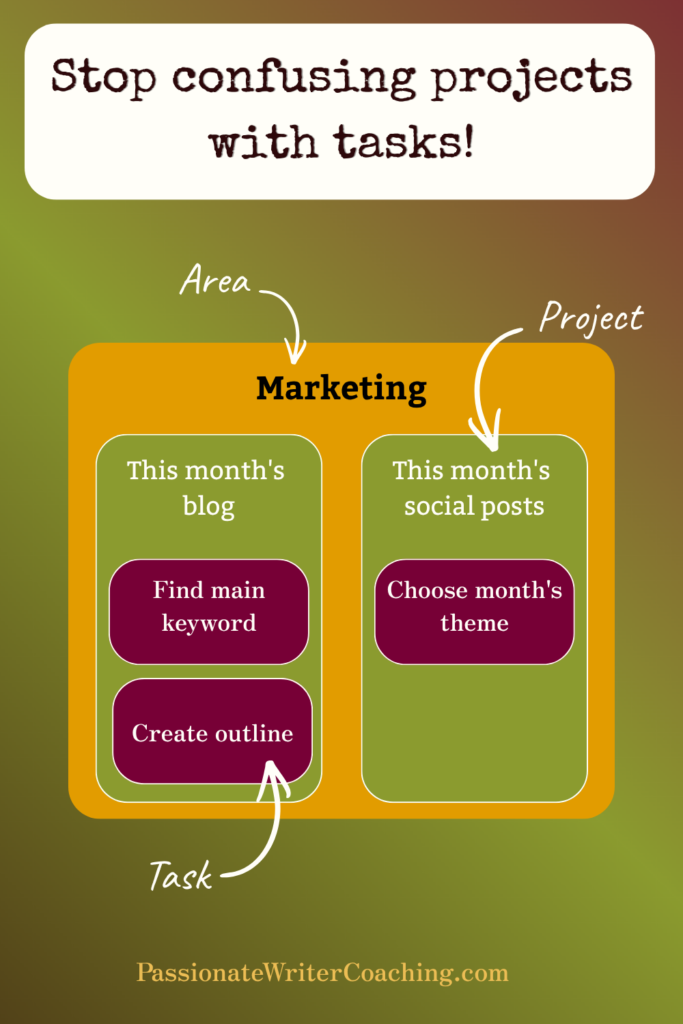
A stands for Area — a category of your life you want to spend time on regularly. Writing, marketing, admin. These are areas, not tasks.

P stands for Project — something within an area that you can actually complete. “Write this month’s blog post” is a project. It has a beginning and an end.

T stands for Task — a small, concrete step within a project. “Find a keyword for my blog post” is a task. It takes a specific amount of time that’s overseeable, it has a clear finish line, and your brain can actually get started on it.

Explanation of the APT system for ADHD task management

Once you’ve categorised what you’re dealing with using APT, the next question is: which of these tasks actually need your hands on them at all? That’s where Siobhan Fox’s TOAST system comes in — and it’s brilliant. (We talked about it on the Unconventional Business Podcast — you can listen here if you want the full conversation.)

Simplify your ADHD task list with templates

A template is nothing more or less than an outline, sketch or model of something that you frequently use, which you can then easily adapt to the current situation. That sounds like a great idea, doesn’t it? Take a task you have been doing from scratch over and over again, then make sure you can just copy-paste the bulk of the work! But you won’t be able to start using templates until you make one profound mindset shift. 

Mindset shift: You don’t have to do things the hard way for them to count: sometimes things are as easy as they appear! 

Once you’ve implemented this shift, you’ll see many opportunities for templating and thus will be saving yourself a lot of time and effort in your task management for ADHD. Start with the emails you need to send time and again. Then, when you catch the templating bug, try out some of my favorite free templates:

  • Design templates (for social media content, documents, etc) on Canva.com.
  • The Storybrand website template created by Donald Miller from Business Made Simple.
  • Tasks and Projects Database template for Notion (my preferred database software) from Thomas Frank

Reduce your task load: outsourcing as an ADHD strategy

Sometimes, task management for ADHD can look like making someone else do the task for you. Outsourcing can be anything, from hiring someone to take care of part of your work (such as an editor, a designer, or a Virtual Assistant); to hiring out a project; to getting the support of an ADHD writing coach (that’s me!). As we discussed on the podcast: outsourcing can not only save you from having to do things you don’t like to do, it can also save you a lot of time on the things you may like too much! But outsourcing often feels like asking for help. And as we discussed in-depth on the podcast, that can be incredibly difficult. It will be easier, though, with the following mindset shift. 

Mindset shift: What’s hard for you can be easy for others, don’t deny people the opportunity to do what they love doing: helping you.

If you’re looking for an editor, ghostwriter or writing coach, make sure to schedule a free meeting with me to discuss the options. If you are looking for other professionals, here are some freelance marketplaces I have experience with, where you can find the freelancer of your dreams:

  • Reedsy (for writing-related freelancers)
  • Fiverr (more general services marketplace)
  • Upwork (another services marketplace)

How to automate repetitive tasks when you have ADHD

Just because something needs to be done, that doesn’t mean it needs to be done manually. We now live in a world where more and more actions can be automated. Tools and systems can be connected to one another, visitors to your website can use apps to take actions themselves… Automations can make your life a lot easier. But only if you actually use them in your task management for ADHD! The problem is that many of us are a bit stuck in our ways. What’s more, we can be control freaks, meaning we might have some fears around letting software do its own thing, without human interference. 

Now, I’m not one of those people who says that every human can be replaced: I think that no AI tool can ever replace human connection in coaching. But I do think that by automating, we can free up a lot of brainspace to do what we do best: create and connect. 

Mindset shift: Figure out what you’re best at, then let software take care of all the menial tasks that are distracting you from what you do best. 

These are my favorite automation tools:

  • Calendly for allowing people to schedule meetings into your calendar (no more 5 emails back-and-forth to find a convenient time!). 
  • Zapier for automatically transferring information from one tool to another. 
  • Later for scheduling social media posts ahead of time and having them post automatically. 

And when you’re done automating your work, why not look into automating your home to make it smart? 

How to systematize recurring tasks with ADHD

Aren’t you tired of reinventing the wheel every time you do something? Well, you can save yourself a lot of headaches if you start systematizing how you handle your most common activities in your task management for ADHD. On the Unconventional Business Podcast episode, for example, we talked about how I realized that every time I needed to instruct a new graphic designer, I pretty much had to give them the same information. So I systematized the process of instructing them.

I’ve also created a system for creating content here online. Whenever I write a blog post, for example, I just go down my checklist of things to do (choose a keyword, create a title, create a cover image, outline the blog post, etc.). That way, I don’t have to figure out how to write a blog post every time I do it, but can use my brainpower to think about the actual content. You need to make sure, however, that these systems remain flexible, or your inner rebel will start to resist. 

Mindset shift: Giving yourself systems is not cheating, nor being lazy. Instead, it helps you be more effective and efficient. 

  • Every single task you often do will require a personalized system, so I can recommend only one tool here. You can use TOAST to systematize your to-do list, and I’ve created a free PDF that will help you systematize that process! Just click the button below to jump straight to the download form. 

The most underrated ADHD task management move: Throw it in the bin

There might be things on your task list that you at some point felt were important. But… Do they really need to be done at all? In bouts of hyperfixation, we often come up with huge, sprawing plans. But when your interest-based nervous system has moved on to the next hyperfixation, all of that doesn’t seem as relevant anymore. Still, removing these tasks from your list without doing them might feel like cheating. So there they remain, on our to-do list, to make us feel guilty and overwhelmed every day, week, or month. But removing them can make task management for ADHD a lot more effective. Sometimes, it can be good to do a purge. Does this task really need to be in your list? Isn’t it time to just throw it in the bin? 

Mindset shift: Just because something felt important a few months ago, that doesn’t mean it is still important today. 

Your ADHD task management system: putting it all together

Task management for ADHD is rarely easy. But with APT to categorise what you’re actually dealing with and TOAST to decide what to do with it, you can stop overcomplicating things.Instead of reinventing the wheel every time, ask yourself of each recurring task whether you can’t Template, Outsource, Automate, Systematize or Throw it in the Bin.

Before you can start effectively using the TOAST system, though, you need two things: the mindset shifts I presented to you in this blog post, and the APT system to make sure that what you’re dealing with is really a TASK, not a project or life area. 

To help you figure out that last part, I’ve created a very practical guidebook that combines Siobhan’s TOAST system with my own APT model. So scroll down a bit more and make sure to grab this free PDF! The worksheets in this guidebook help you break down tasks, and then apply the TOAST framework to each of them. 

Talk to you soon!

– Susanne

Image to promote the free "APT meets TOAST" guidebook

Download this guide to a "whelming" task list!

This guide will help you identify specific tasks by using my APT system, then helps you apply the TOAST system to make sure you never tackle a task from scratch again if you don’t have to.